Your wiki should never be the bottleneck.
Raccoon Page is an ultra-fast, keyboard-first corporate wiki. Lightning-fast page loads. Full keyboard navigation. Import documents from Google Docs, Word, and Markdown. Migrate Obsidian, Confluence, and Notion workspaces. AI-agent friendly via MCP.
Free for super-lean teams. No credit card required.
 ⌘K
⌘KLightning-fast pages
No spinners. No waiting. Every page renders in milliseconds.
Every action from the keyboard
Ctrl+K and you're there. Thirty-plus shortcuts, zero mouse required.
Bring your Confluence docs
Import an HTML or XML space export. Test a sample and review the result.
AI knowledge base. Agent-ready.
Manage pages via MCP (Model Context Protocol). An AI-ready knowledge base, accessible to humans and agents alike.
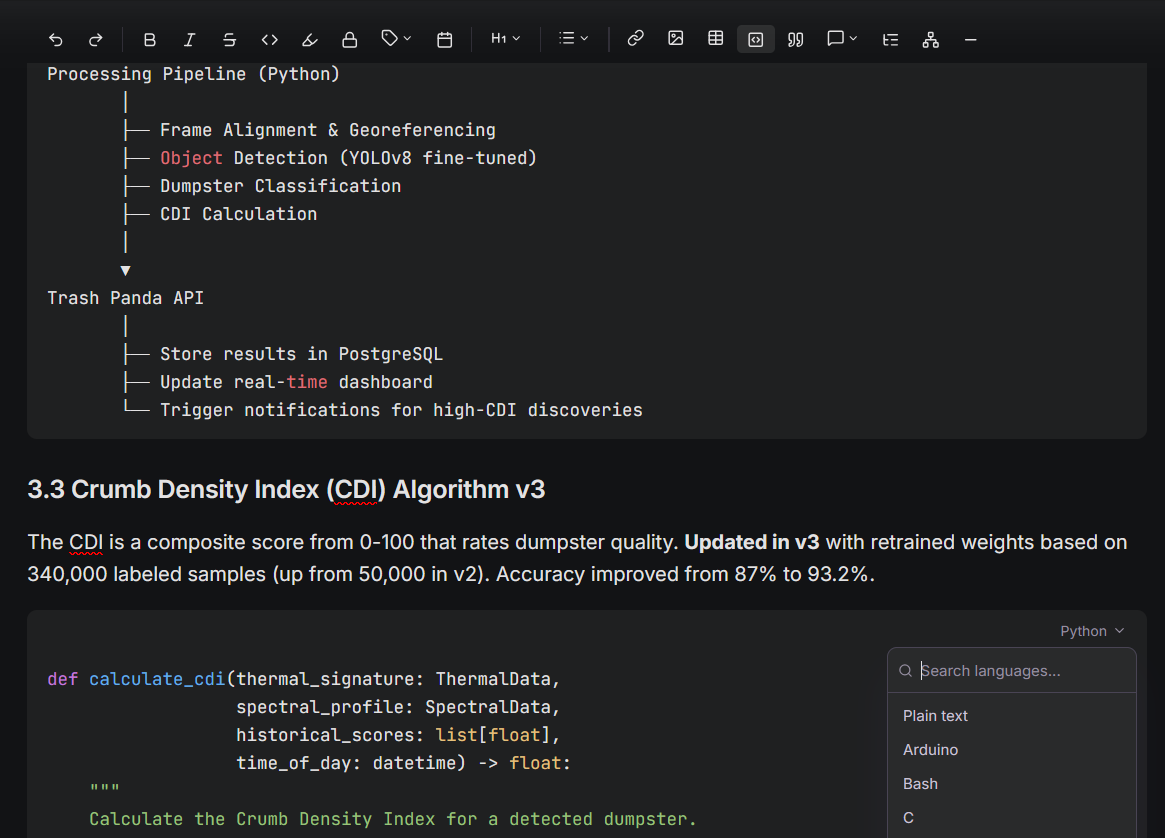
A proper documentation editor.
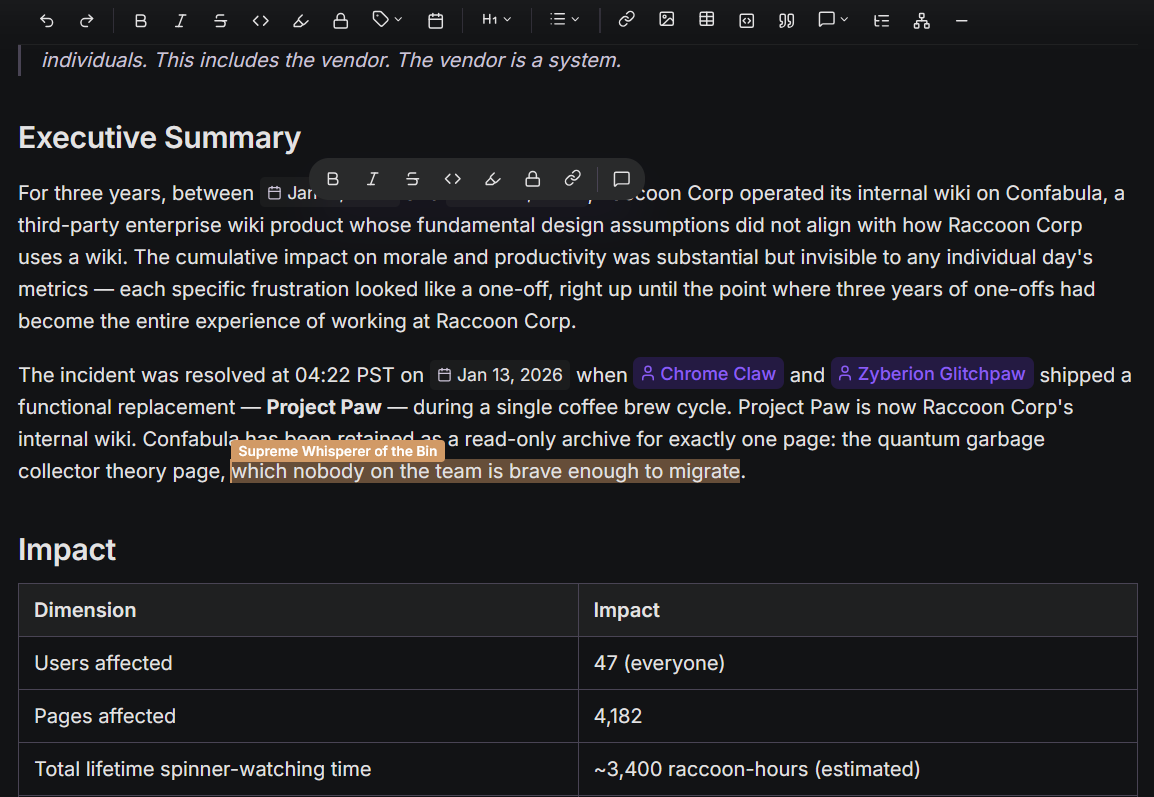
Code blocks, callouts, tables, inline comments, and full Markdown — not a notes app pretending to be one.
Real-time, everywhere.
Edit together with live cursors and auto-save. No merge conflicts, no lost work.
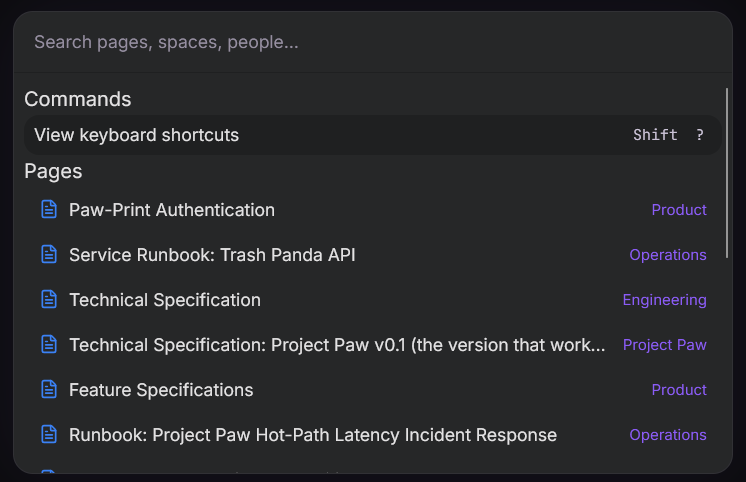
Keyboard-first. Mouse-optional.
Command palette, slash commands, and thirty-plus shortcuts. Navigate and edit without reaching for the mouse.
Migrate without the dread.
Import individual documents from Google Docs, Word, and Markdown, or migrate an Obsidian, Confluence, and Notion workspace. Document imports create ordinary pages; workspace migrations preserve the supported page tree and attachments.

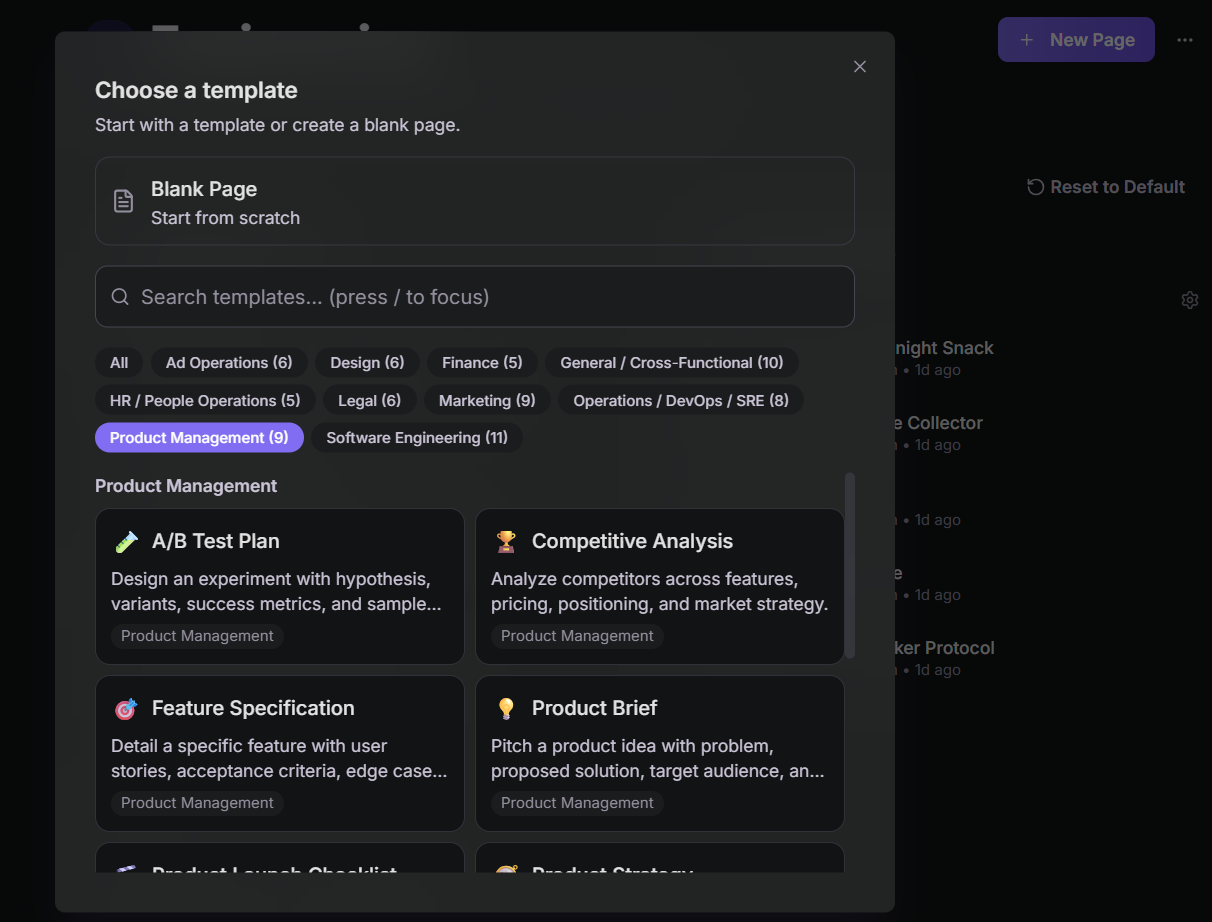
Never stare at a blank page.
Postmortems, meeting notes, API docs, runbooks, process documentation. Start every page with the right structure.
Every edit, preserved.
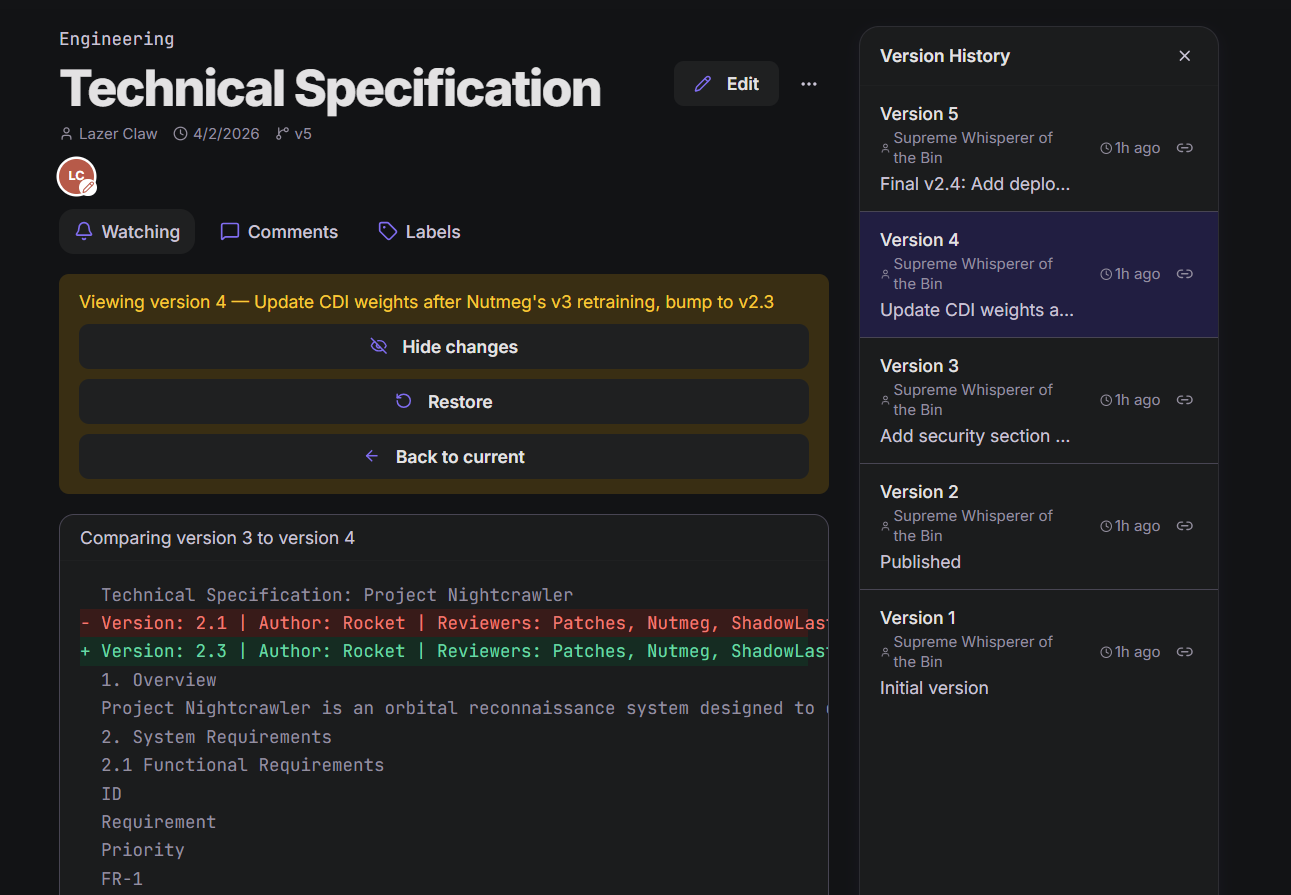
Every change saved with full diff view. One-click revert to any previous version.
Everything else you'd expect.
Collaboration & signal
- Comments with threaded replies
- Notifications for pages you follow
- Activity feed for team visibility
- Page-embedded whiteboards for real-time visual collaboration
Knowledge management & organization
- Ultra-fast search (typo-tolerant, instant results)
- Labels and tags for cross-hierarchy organization
- Organization and space management
- Public spaces — share knowledge bases publicly
Access & interop
- Dark mode (dark-first UI, light mode available)
- Offline mode — work without internet, sync when you're back
- AI-agent friendly — manage your wiki via MCP
- Markdown interoperability — write, import, export
- Export to Obsidian-compatible Markdown
- OAuth login (Google, GitHub)
Built for teams who think fast.
Whether you write code, close deals, or run operations — speed matters.
Engineering Teams
Stop context-switching to a slow wiki. Raccoon Page loads as fast as your IDE. Keyboard shortcuts feel like home. Import your Confluence wiki and never look back.
Operations Teams
Mission-critical knowledge — SOPs and runbooks referenced 50 times a day shouldn't take 5 seconds to load. When the internal wiki is fast, your team actually uses it.
Finance & Consulting
Investment memos, compliance docs, and research notes — instantly accessible during live client calls and market-moving moments.
Support Teams
Find answers before your customer finishes the question. Speed isn't a nice-to-have — it's a customer experience metric.
Simple, transparent pricing.
Start free. Upgrade when your team grows.
Free
For individuals and small teams getting their wiki started.
Included capabilities
- Advanced search
- Templates
Import and export
- Google Docs, Word, and Markdown document import
- Obsidian space import
- Obsidian-compatible Markdown export
Security and support
- Encrypted in transit and at rest
Limits
- Up to 3 users
- 1 space
- Up to 50 total pages
- 3 active whiteboards
- 100 MB storage
- No public spaces
Team
For small technical teams collaborating in one shared source of truth.
$80 per user billed annually
Everything in Free, plus:
- Real-time collaboration and live updates
- Comments and threaded replies
- Labels and tags
- Page version history
- Activity feed
- Offline mode
Import and export
- Confluence and Notion workspace migration
Limits
- Up to 15 users
- Up to 20 spaces
- Up to 5,000 total pages
- Unlimited active whiteboards
- 1 GB storage
- Up to 10 public spaces
Business
For larger teams that need higher limits and governance controls.
$150 per user billed annually
Everything in Team, plus:
- API access
- Custom branding
- Audit log
Security and support
- Priority support
Limits
- Unlimited users
- Unlimited spaces
- Unlimited pages
- Unlimited active whiteboards
- 10 GB storage
- Up to 20 public spaces
All plans include: dark mode, keyboard shortcuts, command palette, MCP access for AI agents, notifications, and OAuth login.
Built on principles, not loopholes.
Your data isn't training fuel
We never use your content to train AI models — and we never sell your data.
Privacy by default
GDPR- and CCPA-compliant from day one. Sensible defaults, no dark patterns.
You're never locked in
Export everything as Obsidian-compatible Markdown, anytime.
Encrypted end-to-end
Encrypted in transit and at rest. Your wiki stays yours.
Frequently asked questions.
How fast is Raccoon Page really?
Pages load in 50-150ms depending on your network. We optimize everything — from hosting to technologies to our algorithms — so the speed difference is immediately noticeable compared to traditional wikis.
Can I import documents from Google Docs, Word, and Markdown or migrate Obsidian, Confluence, and Notion?
Yes. Import a Google Doc from its native URL with one-time, read-only access, or select one or more Word or Markdown files; each successful document becomes an ordinary page. Workspace migrations use an Obsidian vault or a Confluence or Notion export and preserve supported page hierarchy and attachments. Document import and Obsidian migration work on every plan. Confluence and Notion migration are on Team and Business. The under-ten-minute claim applies only to workspace migrations.
Is there a free plan?
Yes. Free forever for up to 3 users, 1 space, and 50 pages. No credit card required. When your team grows beyond that, upgrade to Team or Business.
What about data privacy?
We never use your content to train AI models — that's in our Privacy Policy. We never sell your data to data brokers. We're GDPR and CCPA compliant. You can export all your data at any time as Obsidian-compatible Markdown.
Do you support real-time collaboration?
Yes. Multiple team members can edit the same page simultaneously with live presence indicators. Changes sync instantly. No merge conflicts. Beyond the editor, live updates flow everywhere — when someone creates or edits a page, you'll see it appear in the sidebar, page tree, and activity feed in real time.
Does Raccoon Page include whiteboards?
Embedded whiteboards live inside pages, and a page can contain several independent boards. They do not count toward the page allowance. Free includes 3 active whiteboards; Team and Business include unlimited active whiteboards. Real-time board collaboration is included on every plan.
What keyboard shortcuts are available?
30+ shortcuts covering navigation, editing, and search. Ctrl+K opens the command palette. / triggers slash commands in the editor. Shift+? shows all available shortcuts. Every common action is reachable without a mouse — but everything works great with a mouse too.
Can I use it on mobile?
Yes. The wiki is responsive and works on mobile browsers. Offline mode is available on Team and Business, so eligible wiki content remains available in an airplane, underground garage, or anywhere without a connection. Whiteboard editing is not available on touch devices; use a desktop browser to edit boards. Changes sync when you're back online.
What's the difference between Raccoon Page and Notion?
Notion is a database-first tool where the wiki is one of many features — its "workspace" model is essentially a glorified database. Raccoon Page is a dedicated wiki — faster, more focused, with proper hierarchical page trees and instant page loads. We also have Spaces, but they're content-focused, not database-focused. If you need a wiki, not a workspace, Raccoon Page is purpose-built for that.
Do you have page templates?
Yes. We ship a library of purpose-built templates — Postmortems, Meeting Notes, API Docs, Runbooks, Decision Records, and more. You can also create your own org-specific templates so your team starts every page with the right structure.
Can AI agents work with Raccoon Page?
Yes. Connect a compatible AI assistant through MCP to search and read the Raccoon Page spaces you can access, then create or update pages when the connected user has permission and the client's policy allows the write tool. Generate a personal access token in settings and keep the model, interface, and approval flow in the AI tool you already use.
See how MCP works with Raccoon Page →Your knowledge base deserves better.
Join teams who switched from Confluence, Notion, and Obsidian to a company wiki that actually keeps up.
Get Started FreeNo credit card required. Free for super-lean teams.